
EN / $ USD


MICO
4.96
16588
Top up MICO on ManaBuy with great discounts and enjoy quick, secure processing.
ManaBuy Protections



Select Product

88 Coins
undefined $0.80
$0.99
-$0.19
100 Coins
undefined $0.99
$1.12
-$0.13
445 Coins
undefined $4.03
$4.99
-$0.96
500 Coins
undefined $4.70
$5.61
-$0.91
510 Coins
undefined $4.79
$5.72
-$0.93
900 Coins
undefined $8.21
$9.99
-$1.78
1100 Coins
undefined $10.40
$12.21
-$1.81
2200 Coins
undefined $20.85
$24.42
-$3.57
3300 Coins
undefined $30.35
$36.63
-$6.28
5500 Coins
undefined $49.35
$61.05
-$11.70
5700 Coins
undefined $50.87
$63.27
-$12.40
8800 Coins
undefined $77.85
$97.68
-$19.83
9040 Coins
undefined $79.56
$100.34
-$20.78
11100 Coins
undefined $104.95
$123.21
-$18.26
22200 Coins
undefined $206.95
$246.42
-$39.47
33000 Coins
undefined $306.95
$369.63
-$62.68
55000 Coins
undefined $506.95
$616.05
-$109.10
Top-up Guide
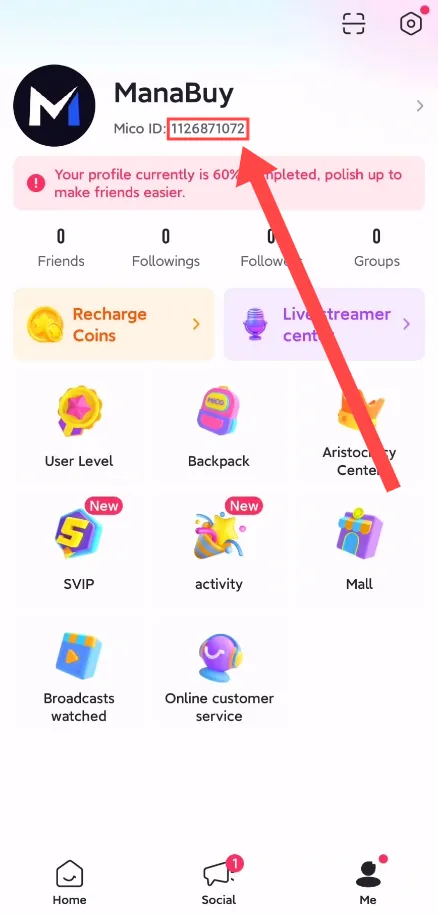
How to Find Your MICO ID?
1. Log in to the APP.
2. Your ID will be displayed on the profile screen.
How to Top UP MICO on ManaBuy?
Step 1
Log in to your ManaBuy account and select your language and currency to ensure it is compatible with your region.
Step 2
Enter the MICO top-up interface.
Step 3
Choose the product of MICO you want to buy.
Step 4
Enter your MICO ID.
Step 5
Click the "Buy Now" button to proceed with payment.
Step 6
Please wait a moment after the payment is completed. The purchased product will be added to your MICO account.
Product Description
About MICO
MICO is a popular social media and messaging app designed for people to interact with others through live streaming, video chats, and instant messaging. It's primarily aimed at connecting people globally, offering a platform for socializing, making new friends, and sharing content.
What are MICO Coins?
Coins are a virtual currency on the MICO platform. They are mainly obtained through purchases and can be used to buy gifts and send them to streamers.
Why Top Up MICO Coins on ManaBuy?
ManaBuy offers fast, secure, and discounted MICO Coins recharges, processing your payments promptly. Enjoy 24/7 customer support, secure transactions, and quick help whenever you need it.
How to Download MICO?


FAQ
How Can I Purchase MICO Coins Through ManaBuy?
To purchase MICO Coins through ManaBuy, simply visit the ManaBuy platform, search for MICO, and select the amount you'd like to purchase. Follow the payment instructions, and your MICO Coins will be credited to your account once the transaction is completed. ManaBuy supports various payment methods for secure transactions.
What Payment Methods Can I Use to Purchase MICO Coins on ManaBuy?
You can use a variety of secure payment methods to buy MICO Coins on ManaBuy, including credit cards (Visa, MasterCard), PayPal, and other local payment options, depending on your region. The platform offers secure and fast payment processing.
Are There Any Discounts or Promotions Available for MICO Coins on ManaBuy?
Yes, ManaBuy occasionally offers exclusive promotions and discounts for purchasing MICO Coins. Keep an eye on the platform for seasonal sales, limited-time offers, and special deals that could provide bonus coins or reduced prices.
What Should I Do If I Face Any Issues with My MICO Coins Purchase on ManaBuy?
If your MICO Coins purchase on ManaBuy is not processed or if there are any issues with the transaction, please contact ManaBuy customer support via live chat or email. Provide your order number, and the support team will assist you in resolving the issue promptly.
User Reviews
View Allarrow_forward_ios4.9
70 Reviews
5
4
3
2
1
Newest
Most helpful

Marcello Navarra
Dec 23, 2025
Purchased:
3300 Coins
clean interface
0 people found this review helpful
Helpful (0)

Pamela Andrea Escalona espinoza
Dec 22, 2025
Purchased:
445 Coins
up almost instantly
0 people found this review helpful
Helpful (0)

Una Gaming
Dec 21, 2025
Purchased:
3300 Coins
good offer today
0 people found this review helpful
Helpful (0)

Shawn I Mal (ScRamBled I.)
Dec 09, 2025
Purchased:
445 Coins
easy to use
0 people found this review helpful
Helpful (0)

Julián H
Dec 03, 2025
Purchased:
3300 Coins
easy to use
0 people found this review helpful
Helpful (0)
Show More
Related Articles
View Allarrow_forward_ios
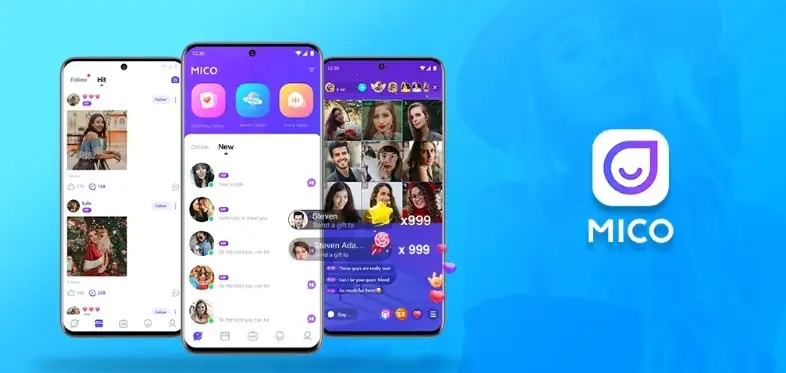
5 Reasons Why You Should Try MICO Live Today
By ManaBuy Review Hub · May 28, 2025
Thinking of joining the live streaming craze? If you're searching for a dynamic, global platform where you can meet new people, have real-time conversations, and even earn while you stream—look no further than MICO Live. Here’s why.

What Makes MICO Live Stand Out? Discover Its Unique Features in 2025
By ManaBuy Review Hub · May 28, 2025
In an era where live streaming platforms are thriving, MICO Live has emerged as a unique space that combines real-time interaction, global social networking, and content creativity. But what exactly sets it apart from platforms like BIGO, Twitch, or Tango?
Trending Deals




Payment Channel Partners






About ManaBuy

Copyright © FUTURE OUTLOOK TECHNOLOGY LIMITED. All rights reserved.UNIT 135,1/F.,143 WAI YIP STREET,KWUN TONG HK