
EN / $ USD

EA SPORTS FC™ Mobile Soccer
4.98
224
Instantly top up EA SPORTS FC™ Mobile on ManaBuy
ManaBuy Protections



Select Product

99 Silver
undefined $0.93
$0.99
-$0.06

499 Silver
undefined $4.64
$4.99
-$0.35

999 Silver
undefined $9.39
$9.99
-$0.60

1999 Silver
undefined $18.89
$19.99
-$1.10

9999 Silver
undefined $93.66
$99.99
-$6.33
4999 Silver
undefined $47.11
$49.99
-$2.88

100 FC POINTS
undefined $0.93
$0.99
-$0.06

520 FC POINTS
undefined $4.64
$4.99
-$0.35

1070 FC POINTS
undefined $9.39
$9.99
-$0.60
2200 FC POINTS
undefined $18.89
$19.99
-$1.10
5750 FC POINTS
undefined $47.11
$49.99
-$2.88

12000 FC POINTS
undefined $93.66
$99.99
-$6.33
Top-up Guide
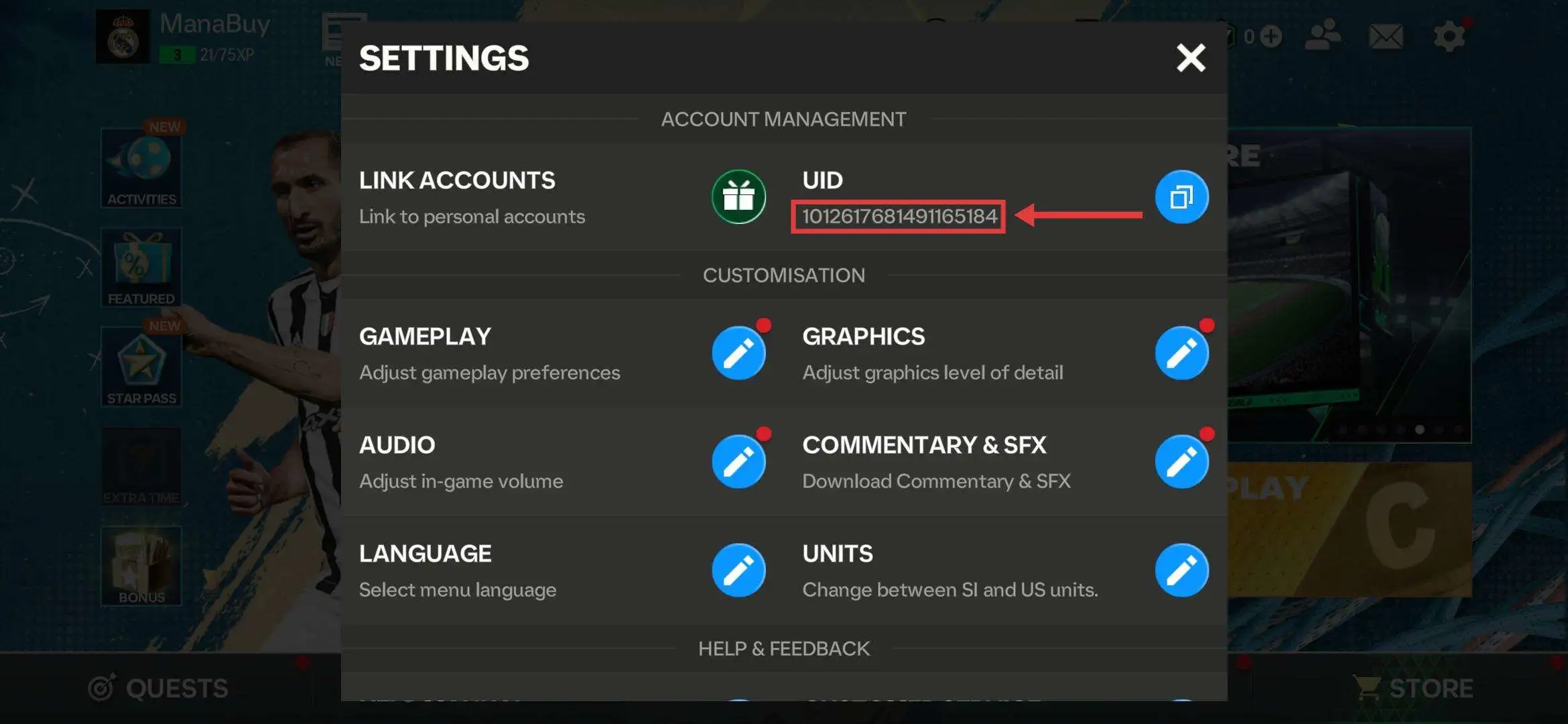
How to Find Your EA SPORTS FC™ Mobile Soccer UID?
1.Log in to the game.
2.Click the upper right corner.
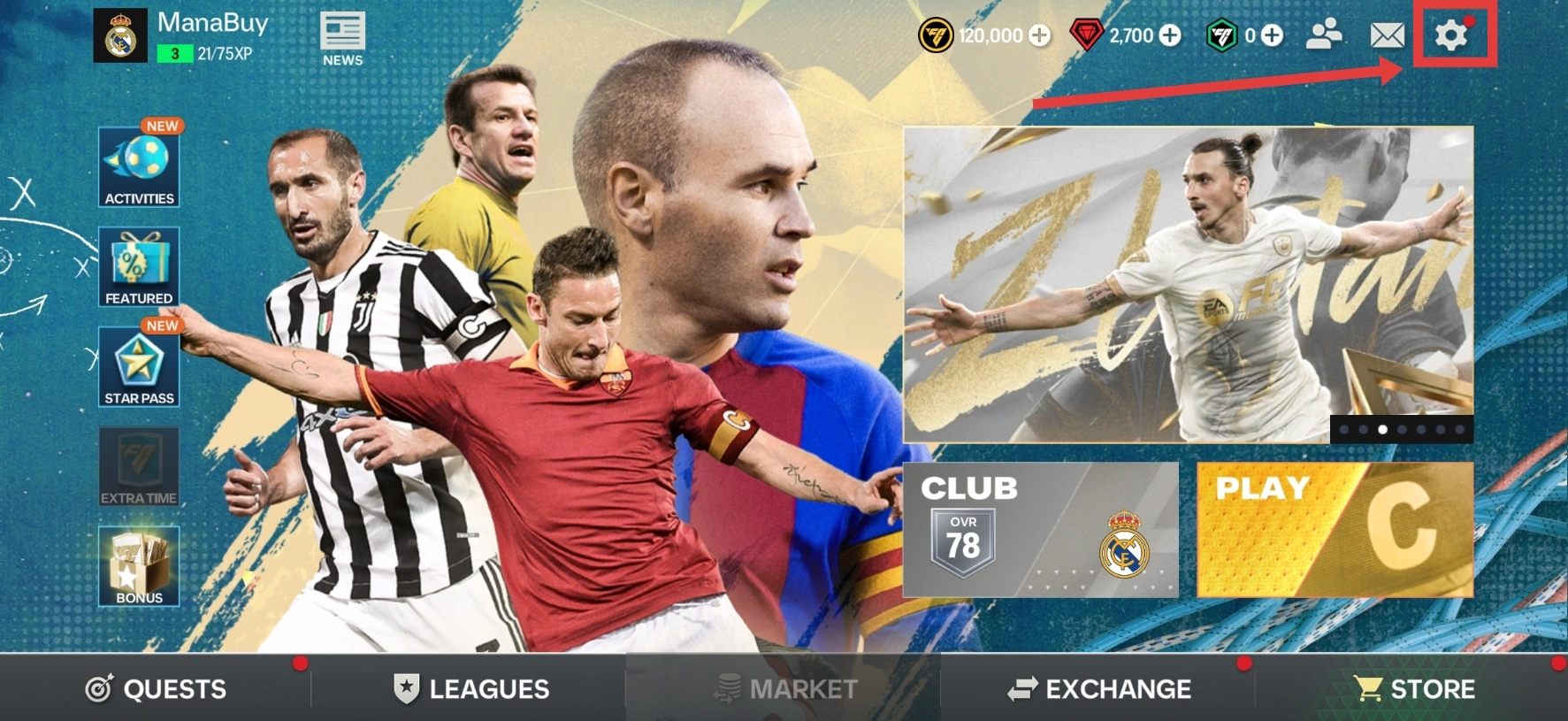
3.Your UID will appear on the screen.
How to Top UP EA SPORTS FC™ Mobile Soccer on ManaBuy?
Step1
Enter the EA SPORTS FC™ Mobile Soccer top-up interface.
Step2
Choose the product of EA SPORTS FC™ Mobile Soccer you want to buy.
Step3
Enter your EA SPORTS FC™ Mobile Soccer and UID.
Step4
Click the "Buy Now" button to proceed with payment.
Step5
Please wait a moment after the payment is completed. The purchased product will be added to your EA SPORTS FC™ Mobile Soccer account.
Product Description
About EA SPORTS FC™ Mobile Soccer
The game is set in the medieval dark fantasy continent "Minexus". It has high-quality anime-style cutscenes, gorgeous skill special effects and a strong Gothic aesthetic. The narrative revolves around the eternal opposition between "fate vs. free will" and "life vs. death".
What are EA SPORTS FC™ Mobile Soccer FC POINTS?
FC POINTS are the official premium currency in EA SPORTS FC Mobile. They are used to buy packs, player cards, event offers, and unlock content in the in-game Store.
What is EA SPORTS FC™ Mobile Soccer Sliver?
Sliver is the the basic in-game currency. Used for upgrading players, training, and buying footballers in the Transfer Market.
Why Top Up EA SPORTS FC™ Mobile Soccer on ManaBuy?
ManaBuy offers a fast and secure way to top up EA SPORTS FC™ Mobile Soccer. With instant processing after payment, you can quickly enjoy your top-up and continue your adventure without delay. Take advantage of ManaBuy’s 24/7 customer support, a variety of payment options, and exclusive discounts for a more rewarding experience.
How to Download EA SPORTS FC™ Mobile Soccer?


FAQ
Why should I buy Silver from ManaBuy?
Because ManaBuy offers discounted Silver packages, instant delivery, and secure payment methods, saving you time and effort compared to farming Silver in-game.
Why is ManaBuy the best place for FC Mobile top up?
ManaBuy combines cheap FC Points prices, instant delivery, secure payment, and 24/7 support, making it the most convenient and reliable platform for EA SPORTS FC™ Mobile top up.
Why should I buy FC Points from ManaBuy instead of the app store?
ManaBuy partners with authorized distributors and purchases in bulk, allowing us to offer discounted FC Points compared to standard Google Play or App Store pricing.
Does ManaBuy offer different FC Points packages?
Yes. You can choose from multiple FC Points bundles, ranging from small packs to bulk packages, depending on your needs.
User Reviews
View Allarrow_forward_ios4.9
43 Reviews
5
4
3
2
1
Newest
Most helpful

Issan HellBoy
Dec 23, 2025
Purchased:
99 Silver
priced well today
0 people found this review helpful
Helpful (0)

Luan Löwe
Dec 22, 2025
Purchased:
99 Silver
nicely priced today
0 people found this review helpful
Helpful (0)

Andrei Gira
Dec 21, 2025
Purchased:
99 Silver
fair tag today
0 people found this review helpful
Helpful (0)

Alexandre Sousa
Dec 14, 2025
Purchased:
99 Silver
very quick to confirm; showed moments later
0 people found this review helpful
Helpful (0)

DaReK
Dec 09, 2025
Purchased:
99 Silver
very quick to confirm; showed moments later
0 people found this review helpful
Helpful (0)
Show More
Related Articles
View Allarrow_forward_ios
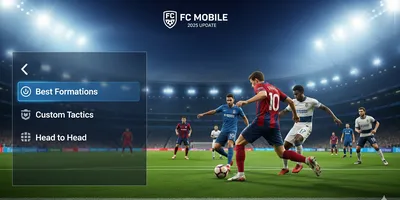
The Best Formations and Custom Tactics for Head to Head in FC Mobile (2025 Update)
By ManaBuy Newsroom · Sep 19, 2025
See the best formations and custom tactics for Head to Head in FC Mobile 2025. Boost your wins with top setups and strategies using the best formations.

EA FC 26 Liverpool Ratings Leak: Salah, Van Dijk & Alisson Shine
By ManaBuy Newsroom · Sep 19, 2025
Liverpool FC ratings in EA FC 26 revealed—Salah leads with 91, Van Dijk at 90, Alisson at 89. Full breakdown of midfielders, defenders & up-and-coming stars.




Payment Channel Partners





About ManaBuy

Copyright © FUTURE OUTLOOK TECHNOLOGY LIMITED. All rights reserved.UNIT 135,1/F.,143 WAI YIP STREET,KWUN TONG HK