
EN / $ USD


Bigo Live
4.98
11144
Top up Bigo Live with great discounts, fast processing, and secure transactions on ManaBuy.
ManaBuy Protections



Select Product

80 Diamonds
undefined $1.56
$1.86
-$0.30
160 Diamonds
undefined $3.18
$3.72
-$0.54
240 Diamonds
undefined $4.60
$5.57
-$0.97
400 Diamonds
undefined $7.93
$9.29
-$1.36
500 Diamonds
undefined $9.83
$11.62
-$1.79
800 Diamonds
undefined $15.81
$18.59
-$2.78
1000 Diamonds
undefined $19.90
$23.23
-$3.33
1600 Diamonds
undefined $32.06
$37.17
-$5.11
2000 Diamonds
undefined $40.13
$46.46
-$6.33
2400 Diamonds
undefined $48.21
$55.76
-$7.55
4000 Diamonds
undefined $79.46
$92.93
-$13.47
8000 Diamonds
undefined $164.65
$186.54
-$21.89
10000 Diamonds
undefined $206.25
$232.34
-$26.09
16000 Diamonds
undefined $334.65
$371.74
-$37.09
24000 Diamonds
undefined $504.65
$557.61
-$52.96
Top-up Guide
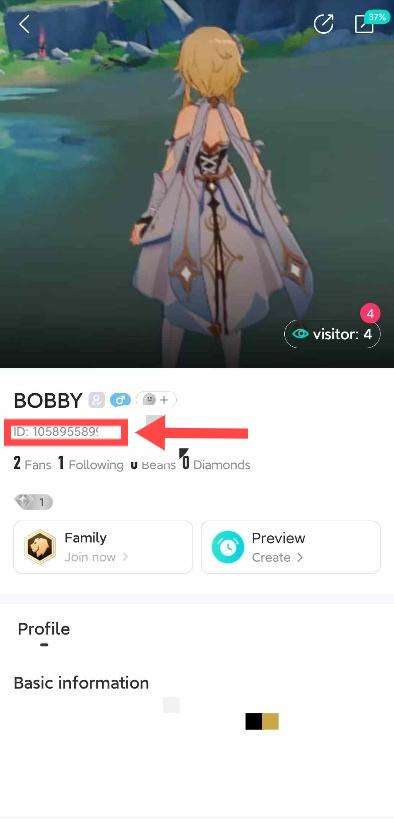
How to Find Your Bigo Live ID?
1. Log in to the APP.
2. Open your profile.
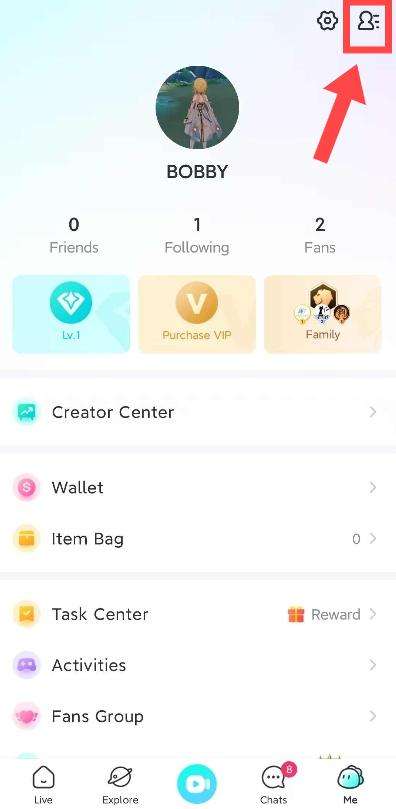
3. Your ID will be displayed on the profile screen.
How to Top Up Bigo Live on ManaBuy?
Step 1
Log in to your ManaBuy account and select your language and currency to ensure it is compatible with your region.
Step 2
Enter the Bigo Live top-up interface.
Step 3
Choose the product of Bigo Live you want to buy.
Step 4
Enter your Bigo Live ID.
Step 5
Click the "Buy Now" button to proceed with payment.
Step 6
Please wait a moment after the payment is completed. The purchased product will be added to your Bigo Live account.
Product Description
About Bigo Live
Bigo Live is a live streaming platform with social functions. Users can start live streaming and interact with the audience in real time at any time. In addition to the live streaming function, the platform also provides short video functions. Users can upload, watch, like and share short video content. Bigo Live has now become one of the most popular live streaming social platforms.
What are Bigo Live Diamonds?
Diamonds are a virtual currency on the Bigo Live platform. They are mainly obtained through purchases and can be used to buy gifts and send them to streamers.
Why Top Up Bigo Live Diamonds on ManaBuy?
ManaBuy offers fast, secure, and discounted Bigo Live Diamonds recharges, processing your payments promptly. Enjoy 24/7 customer support, secure transactions, and quick help whenever you need it.
How to Download Bigo Live?


FAQ
What Should I Do If My Bigo Live Diamonds Haven’t Been Delivered?
If your Bigo Live Diamonds haven’t arrived after completing the payment, first ensure you entered the correct account details. Wait for a few minutes, as there may be a slight delay in processing. If the Diamonds still haven't been credited, contact ManaBuy customer support with your order number. Our support team is available 24/7 to assist you promptly.
How Do I Top Up Bigo Live Diamonds on ManaBuy?
To top up Bigo Live Diamonds on ManaBuy, simply visit the Bigo Live recharge page, select the amount of Diamonds you wish to purchase, enter your account details, and complete the payment. Your Diamonds will be credited to your account after the transaction is successful.
What Are the Benefits of Buying Bigo Live Diamonds on Manabuy?
Buying Bigo Live diamonds can unlock some exclusive features, send gifts, and see special content. With diamonds, you can support your favorite anchors, improve your live broadcast experience, and unlock more interactive tools. There are also discounts for buying diamonds on ManaBuy, which allows you to spend less money and get more emotional value.
Can I Use Coupons for Top-Ups Bigo Live on ManaBuy?
Yes, ManaBuy provides coupons for new users, allowing you to get even greater discounts when recharging Bigo Live. Simply register on the platform and use the coupons at checkout to enjoy a bigger discount on your recharge.
User Reviews
View Allarrow_forward_ios4.9
80 Reviews
5
4
3
2
1
Newest
Most helpful

Júnior Medeiros
Sep 19, 2025
Purchased:
800 Diamonds
Diamonds ready for gifting
0 people found this review helpful
Helpful (0)

Julián H
Sep 19, 2025
Purchased:
240 Diamonds
Diamonds appeared right away
0 people found this review helpful
Helpful (0)

Nicha Bidou
Sep 18, 2025
Purchased:
80 Diamonds
Diamonds ready for gifting
0 people found this review helpful
Helpful (0)

Marcos Santana santos
Sep 18, 2025
Purchased:
400 Diamonds
Diamonds showed up promptly
0 people found this review helpful
Helpful (0)

Maikoll Roopchand
Sep 17, 2025
Purchased:
160 Diamonds
Diamonds ready for gifting
0 people found this review helpful
Helpful (0)
Show More
Related Articles
View Allarrow_forward_ios
Why Creators Choose Bigo Live to Go Live
By ManaBuy Review Hub · Mar 28, 2025
If you are considering becoming a live streamer, Bigo Live will be a very good platform to start with.
Bigo Live: More Than Streaming — It’s About Being Seen
By The ManaBuy Testing Lab · Mar 28, 2025
Today, when live broadcast platforms are flourishing, Bigo Live can still maintain high activity worldwide, relying not only on traffic, but also on the "instant connection between people" it has established.




Payment Channel Partners






About ManaBuy


Copyright © FUTURE OUTLOOK TECHNOLOGY LIMITED. All rights reserved.UNIT 135,1/F.,143 WAI YIP STREET,KWUN TONG HK